
Unreal Engine 5.8 Mutable Sample Updated: Real-Time Character Customization Explained
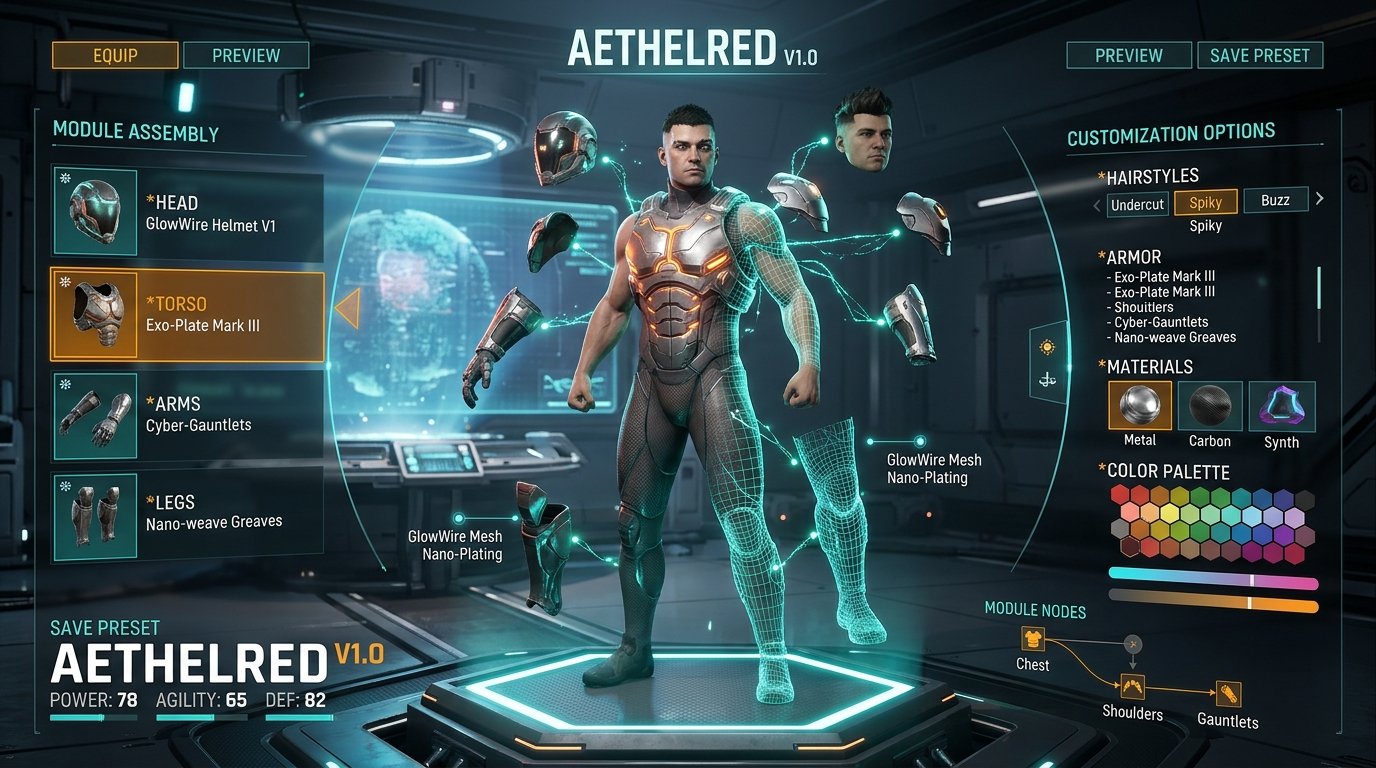
Building a robust, real-time character customization system has long been one of the most notorious engineering hurdles in modern game development. Balancing modular armor swapping, facial variations, dynamic hairstyles, and body morphing while preventing mesh clipping and managing escalating draw calls often forces studios into agonizing technical compromises. With the latest update to the official Mutable Sample project on Fab for Unreal Engine 5.8+, Epic Games has provided developers with a production-ready blueprint for solving these challenges at runtime.
Acquired and refined by Epic, the Mutable plugin represents a paradigm shift in procedural mesh compilation. Instead of relying on expensive layered skeletal meshes or compounding heavy multi-material shader graphs, Mutable compiles dynamic, optimized, single-draw-call characters on the fly. In this comprehensive guide, we unpack the updated Mutable Sample, dissect its core architecture, explore the groundbreaking dataless MetaHuman integration, and walk you through practical implementation steps for your own UE5 projects.
Core Highlights of the Updated Mutable Sample
- Dataless MetaHuman Workflow: Swap facial features, hairstyles, clothing, and body proportions on high-fidelity MetaHumans without reconstructing core asset graphs.
- Automatic Mesh Culling: Eliminates hidden polygons underneath jackets, boots, and gloves dynamically to prevent clipping and conserve GPU rendering cycles.
- Dynamic Texture & Color Masking: Combine diffuse, roughness, and normal maps in real time using runtime UV packing and layered tint systems.
- Infinite Crowd Testing: Test thousands of procedurally randomized NPCs in real-time benchmark levels with zero performance degradation.
What Exactly is Mutable in Unreal Engine 5.8?
At its technical core, Mutable is a runtime asset compilation engine integrated natively into Unreal Engine. In traditional character customization pipelines (common in survival games and RPGs), studios attach modular skeletal meshes to a master skeleton. If an avatar wears a chest plate, gauntlets, greaves, a helmet, and a cape, the game engine renders five separate skeletal mesh components, each requiring its own draw calls, skinning evaluations, and material passes.
Mutable turns this paradigm inside out. When a player selects an outfit, equips a weapon attachment, or customizes skin pigmentation, Mutable takes the modular ingredients—meshes, textures, and parameters—and executes an on-demand procedural compile. It bakes the active components into a single, highly optimized Skeletal Mesh and packs the relevant textures into unified texture sheets. The result is a character that renders with the speed and memory footprint of an uncustomized, monolithic hero asset.
Deconstructing the Updated Mutable Sample on Fab
Available as a free download through the Fab marketplace, the official Mutable Sample serves as both an interactive showcase and an architectural template. While earlier iterations focused on basic mannequin swaps, the UE 5.8 update introduces modern production standards tailored for next-generation productions:
1. The MetaHuman Integration Pipeline
The centerpiece of the updated sample is its full support for MetaHuman technology, demonstrated through the modular “Ada” preset. Previously, integrating complex MetaHuman grooms, intricate rig hierarchies, and facial morph targets with modular clothing was exceptionally tedious. The new sample demonstrates a dataless workflow—a modular data architecture where developers can ingest new garments and props into Customizable Objects without hard-coding changes into the base character graph.
2. Weapon and Prop Customization
The project extends beyond biological characters. A dedicated weapon customization station demonstrates how scopes, barrels, stocks, magazines, and dynamic wear-and-tear camouflage patterns can be assembled onto hard-surface weapon rigs using the same procedural logic.
3. The “Infinite Level” Stress Test
To demonstrate scalability, the sample includes an “Infinite Level” environment. Developers can spawn hundreds of procedurally randomized characters simultaneously. The benchmark monitors VRAM usage, texture streaming pools, and frame times, proving that Mutable eliminates the memory bottlenecks that typically plague open-world crowd systems.
Architectural Deep Dive: Customizable Objects (.uasset)
To master Mutable, creators must understand its primary asset type: the Customizable Object. Inside the Unreal Editor, Customizable Objects are authored using an intuitive node graph that resembles a hybrid between the Material Editor and Control Rig.
| Node Type | Function in Pipeline | Performance Benefit |
|---|---|---|
| Base Object Node | Defines the root skeleton, master LODs, and core skin surfaces. | Single baseline draw call initialization. |
| Skeletal Mesh (SKM) Node | Ingests modular clothing, armor parts, and accessory geometries. | Automated LOD and material mapping across pins. |
| Mesh Clip Morph Node | Removes body geometry obscured by active garments. | Stops clipping and reduces hidden vertex count. |
| Texture Layer & Color Tint | Blends patterns, decals, dirt passes, and color masks onto textures. | Eliminates unique texture file bloat in memory. |
Step-by-Step Tutorial: Implementing Modular Armor in Mutable
Here is how you can set up a modular armor piece using the Mutable pipeline in Unreal Engine 5.8:
Step 1: Enable the Mutable Plugin
Navigate to Edit > Plugins, search for Mutable, and ensure both the runtime and editor plugins are checked. Restart Unreal Engine to load the compiler modules.
Step 2: Create a Customizable Object Extension
In your Content Browser, right-click and navigate to Animation > Mutable > Customizable Object Extension. Name the asset COE_TorsoArmor_01. This extension represents your modular clothing piece and references your base character.
Step 3: Connect Your Skeletal Mesh
Open COE_TorsoArmor_01 in the Mutable graph editor. Add a Skeletal Mesh Node and pick your armor mesh. Connect the mesh output pin to the Add Component Mesh input of your base Customizable Object node. Notice how UE 5.8 automatically matches skeleton bones and LOD chains without manual wiring.
Step 4: Configure Mesh Clipping to Stop Body Poke-Through
To ensure the player's torso mesh does not clip through the armor during extreme animations, add a Mesh Clip Morph Node or select the Remove Mesh Sections property on the torso bone mask. Define a bounding volume or tag the body polygons covered by the chest plate. When this armor is equipped, Mutable automatically culls the underlying torso vertices during compile!
Step 5: Expose Dynamic Color and Decal Parameters
Add a Vector Parameter node named ArmorColor and connect it to a Color Layer Node driving your armor material's diffuse channel. In your UI Blueprint, you can now adjust this parameter via a color wheel, giving players total aesthetic freedom without extra texture memory.
Memory Management: Why Mutable Outperforms Traditional Sockets
In an open-world RPG with 50 unique players or NPCs on screen, traditional modular pipelines require keeping dozens of distinct material instances and texture sets resident in VRAM. If every player wears a distinct combination of armor and helmets, texture streaming budgets quickly blow out, resulting in blurry mip-maps and frame stuttering.
Mutable circumvents this by managing an active cache of baked runtime assets. Once a character's configuration is assembled, the resulting combined mesh and texture atlases are held in a memory pool managed by the Mutable runtime manager. If two NPCs share the same chest plate or color scheme, Mutable intelligently reuses cached runtime sub-assets, reducing overall project memory footprint by up to 60% compared to brute-force skeletal attachments.
Complementing Mutable with Production-Ready 3D Assets
A procedural customization engine is only as compelling as the 3D assets that feed it. Whether you are assembling fantasy warriors, sci-fi troopers, or realistic urban pedestrians, having clean topology, normalized pivot points, and modular seams is essential for seamless Mutable compilation.
Explore our library of clean, game-ready DownloadVFX 3D models and character assets. Our meshes are optimized with standardized skeleton hierarchies, game-ready UV layouts, and high-fidelity PBR texture sets ready to drop directly into your Customizable Object graphs. For cinematic flair, layer your game trailers and real-time sequences with our cinematic visual effects overlays and interactive game sound effects.
Frequently Asked Questions (FAQ)
Is the Mutable plugin officially supported by Epic Games for commercial games?
Yes. Mutable is an official, first-party Epic Games plugin fully supported for commercial production in Unreal Engine 5.8 and beyond. It is used in production titles across PC, console, and mobile platforms.
Does Mutable work on MetaHuman facial rigs and grooms?
Yes. The updated UE 5.8 Mutable Sample specifically demonstrates seamless integration with MetaHuman body types, facial morph targets, and Strand-based Groom hair assets, allowing runtime hair swapping and facial restructuring without breaking animation rigs.
What is the performance overhead of compiling a character at runtime?
Mutable compiles occur asynchronously on background worker threads. While an initial compile takes between 10ms and 50ms depending on mesh complexity, subsequent rendering is faster than standard skeletal meshes due to reduced draw calls and unified texture passes.
Conclusion: The Future of Real-Time Avatars in Unreal Engine 5.8
The updated Mutable Sample on Fab confirms that modular avatar customization no longer requires choosing between visual fidelity and runtime performance. By fusing node-based mesh logic, automatic polygon culling, and dataless MetaHuman workflows, Unreal Engine 5.8 provides developers with a world-class framework for building deep player customization and believable living worlds.
Download the Mutable Sample from Fab today, test the Infinite Level benchmark on your development rig, and integrate Mutable's Customizable Objects into your studio's asset pipeline to unlock next-generation character creation.